

Continuous localization is the practice of translating and adapting content the moment it changes in your codebase, automatically and in parallel with development, rather than waiting until a release is “finished.”
Instead of treating translation as a final, separate stage, your localization workflow runs alongside your development cycle, so users in every language get new features at the same time.
For most software companies, this is the difference between shipping globally on day one and shipping in your home market now and everywhere else “eventually.” Below, we explain:
- How continuous localization works.
- How it differs from agile localization.
- Yhe challenges that come with it (including the ones tool vendors rarely mention).
- How to implement it,
Drawing on what we see every day as a language service provider working inside fast-moving development teams.
What is continuous localization?
Continuous localization is the process of localizing ever-changing content while working in parallel with agile development cycles. As new or updated strings appear in your source code, they are detected, sent for translation, and merged back into the product automatically—often many times a day.
In practice, a continuous localization workflow:
- Detects new or changed source strings as soon as they are committed.
- Syncs those strings to a translation management system (TMS) without manual file handling.
- Triggers translation work automatically.
- Delivers finished translations back into the product, ready for release.
The core idea is synchronization. Continuous localization requires a seamless connection between your TMS and the rest of your production process.
It reduces reliance on manual practices, such as emailing spreadsheets or exporting and re-importing files, and automates the repetitive parts of the workflow so that your translated content is always in a continuous state of production and delivery.
Continuous localization vs. continuous translation
These terms are often used interchangeably, but they are not the same thing. Continuous translation is narrow: it refers to translating new or changed strings as they appear, frequently with the help of machine translation.
Continuous localization is broader. It includes translation, but it also covers string management, automation through your CI/CD pipeline, versioning and synchronization, quality assurance, and delivery back into the live product. Translation is one component of a complete continuous localization workflow—not the whole of it.
From waterfall to agile to continuous localization
To understand why continuous localization exists, it helps to trace how software development (and localization with it) evolved.
Waterfall localization (and why it breaks)
In the 1980s and 1990s, a relatively fixed software development process emerged that allowed teams to collaborate on large programs. Developers would work on code for weeks or months; when a batch was complete, it went to the quality assurance (QA) team for testing, and then to operations for deployment. This is the classic “waterfall model”: sequential, stable, and complete, but slow.
Localization inherited the same shape. At the end of the development cycle, developers would gather source files in various formats and hand them to translators, who would prepare large batches, run rounds of revision, fix issues, and send the translated files back to be merged and published manually.
The problems pile up quickly. Breaking text into strings is tedious. File formats differ between developers and translators, wasting time and introducing errors. Releases stall while everyone waits for translation to finish. Progress is hard to see, so projects stretch. And if anything is wrong, the whole cycle repeats. A slower time to market is costly, both in market share and in customer feedback you never get to act on. Silicon Valley’s “fail fast, fail often” motto exists for a reason: the sooner a product reaches users, the sooner you learn from them.
Agile localization
Early in the 21st century, the agile model emerged to solve waterfall’s pacing problem. Requirements are broken into small pieces that can be developed and tested individually, shrinking the interval between releases and letting teams adjust continuously based on user feedback.
As the internet raised competition, DevOps folded operations into the agile process to achieve rapid, market-driven iteration.
Agile localization is the practice of incorporating translation into an agile product development cycle so that both processes run at the same time. Translation happens in parallel with sprints, in smaller batches: part of a feature, not the whole product at once. A typical agile localization workflow looks like this:
- New code with new strings is pushed to the code repository.
- Changes are automatically detected, and content that needs translating is pushed to the TMS.
- Translators translate and review the content in the TMS.
- Finished translations are merged back into the repository.
Agile localization depends on automation, because string management and file exchange now happen far more frequently than in a waterfall world.
What’s the difference between agile and continuous localization?
While closely related, there are two key differences:
- First, in agile localization, translation work happens in sprints: discrete jobs tied to a development cycle. In continuous localization, there is effectively one never-ending sprint, a continuous flow of work rather than a series of batches.
- Second, and more importantly, in agile localization the content is not always ready to release; you have to wait for the sprint to finish. In continuous localization, content is always ready for release because localization is fully integrated into the continuous delivery workflow. Once engineers set it up, they no longer have to think about it. That shift, from job-based to always-on, is the heart of continuous localization.
How continuous localization works
At a high level, continuous localization connects three things: your source content and code, your localization management layer (the TMS), and your translation workflows. A typical end-to-end cycle looks like this:
- A developer adds or updates a user-facing string.
- The change is committed and pushed to source control (for example, GitHub).
- A CI/CD system or webhook detects the update.
- The new strings are synchronized to the localization platform automatically.
- Translation workflows are triggered, and the work is assigned.
- Completed translations are delivered back into the application, ready for the next deployment.
These steps can run multiple times a day, fully automated. The clearest way to see the value is to compare the two approaches side by side:
| Traditional (waterfall) localization | Continuous localization |
|---|---|
| Manual string export and import | Automatic synchronization |
| Large, infrequent translation batches | Small, frequent updates |
| Localization happens after development | Localization happens during development |
| High risk of missing or stale strings | Changes tracked in real time |
| Releases wait on translation | Faster, more predictable releases |
By closing the gap between code changes and translation, continuous localization lets teams move faster without sacrificing quality.
The role of automation
Automation is what makes localization continuous. Without it, you simply have agile localization with a lot of manual hand-offs. The point of a continuous workflow is to free people from transactional tasks (file conversion, uploading, downloading, emailing) so they can focus on judgment-heavy work like translation quality and context.
The common automation points are:
- Detection: Identifying changed strings on a pull request or merge
- Synchronization: Pushing those strings into the TMS, and pulling finished translations back
- Triggering: Kicking off translation pipelines automatically when content changes
- Validation: Failing a build if translations are missing or placeholders are broken
- Delivery: Publishing translations alongside (or independently of) app deployments
A useful way to think about it: continuous localization uses tooling to identify, push, check, return, publish, and notify, so the humans involved can play a more valuable role rather than shuffling files. Crucially, automation does not mean everything is machine-translated.
Most teams use a hybrid: machine or AI translation for speed, human review where quality matters, and different workflows for different languages or content types.
The real challenges of continuous localization
While the tooling matters, continuous localization is shaped by the human side of translation.As a language service provider that works inside these workflows, here is what actually needs solving.
Challenge 1: Bidirectional connection
A TMS was not originally built for UI localization. In the broader translation world, UI is a tiny slice of the content that needs translating; documents, tables, books, and multimedia each bring their own complexity, which historically made TMS platforms cumbersome. A TMS also has to connect to computer-assisted translation (CAT) tools, because that’s where translators actually work, and a poor connection causes interruptions and reliability problems.
For years, offline files were passed around and a TMS was rarely connected directly to a content source. Middleware was one workaround, but as third-party software it brought instability and slow updates. The real fix is a direct, two-way connection between the TMS and your content sources. Modern TMS platforms that support continuous localization can connect to most content sources so that changes are automatically converted into translatable content, with an interface that’s genuinely translator-friendly.
Challenge 2: Translating short, context-poor strings
UI strings are short and snappy, and they often convey complete meaning only in a specific context. That’s hard for translators. A button labeled “Run” or a status like “Complete” can be translated several defensible ways, and the wrong one breaks the experience.
Two things solve this. First, development teams need to provide as much instruction as possible and answer translator queries quickly. Second, translators need to see the product—logging in, performing operations, and learning context from how strings are actually used. TMS platforms that support pushing multimedia context (screenshots, audio, video) alongside strings help translators understand where and how content appears, improving both speed and accuracy.
Challenge 3: The translator talent and workload problem
Here is a challenge tool vendors almost never mention. For a translator, UI strings are slow, time-consuming work with a low input-to-output ratio, and they may arrive daily rather than occasionally. That makes UI translation hard to staff: it’s difficult for an LSP to attract and retain skilled translators for a stream of tiny, unpredictable jobs, and it’s awkward for translators to price work that might be a hundred words a few times a week.
Yet consistency demands that the *same* dedicated translators handle a product’s strings over time, so features aren’t misrepresented from one update to the next. The way through is workload planning: an experienced LSP predicts volume through ongoing dialogue with the client, blends small UI jobs with larger content so translators keep a steady output, and uses data—rather than gut feel—to match a translator’s specialization to the subject matter. This is operational, human work, and it’s exactly where a service partner earns its place in an otherwise automated pipeline.
Challenge 4: Multi-party collaboration
A single short string might originate with a product manager, or emerge from a discussion between UX writers and designers. It then passes to your localization colleagues, to the LSP’s project manager, and on to translators—sometimes via a neutral pivot language like English first. At every link, queries get raised, answers get given, and errors get caught. How a translation is judged varies by role, so any disagreement means more time spent communicating.
Good CAT and TMS tools support this collaboration directly—live chat or comments between PMs, translators, and reviewers, and in some cases between the translation team and the requesting side (for example, talking to designers through a Figma integration). But tools only carry the conversation; they don’t replace the need for a team that knows how to have it.
Continuous localization in action: a hands-on demo
The fastest way to understand continuous localization is to build a small version of it. Here’s a walkthrough connecting a translation platform (we’ll use Lokalise) to a GitHub repository. The same principles apply to any TMS-and-Git combination.
Start by finding a real project to localize. On GitHub, you can search for an Android game written in Java that was updated recently, for example an open-source pinball game. Fork it to copy the source code to your own repository so you can modify it freely, and confirm it runs.

Checking its resource files, you’ll typically see it’s available in several languages but missing the one you want to add, say Chinese.

Our goal is to localize it into Chinese and run it through a continuous workflow. To do that, you need tooling that can:
- Connect to the code repository, identify resource-file updates in real time, and pull them.
- Push those updates into your CAT/translation environment.
- Return finished translations to the repository.
A cloud TMS like Lokalise offers all three. After signing up, create a project.

Select your content source.

And connect to the forked repository (copy the English source fields into a target-language folder, for example `values-zh`, first).

Choose which files to pull.

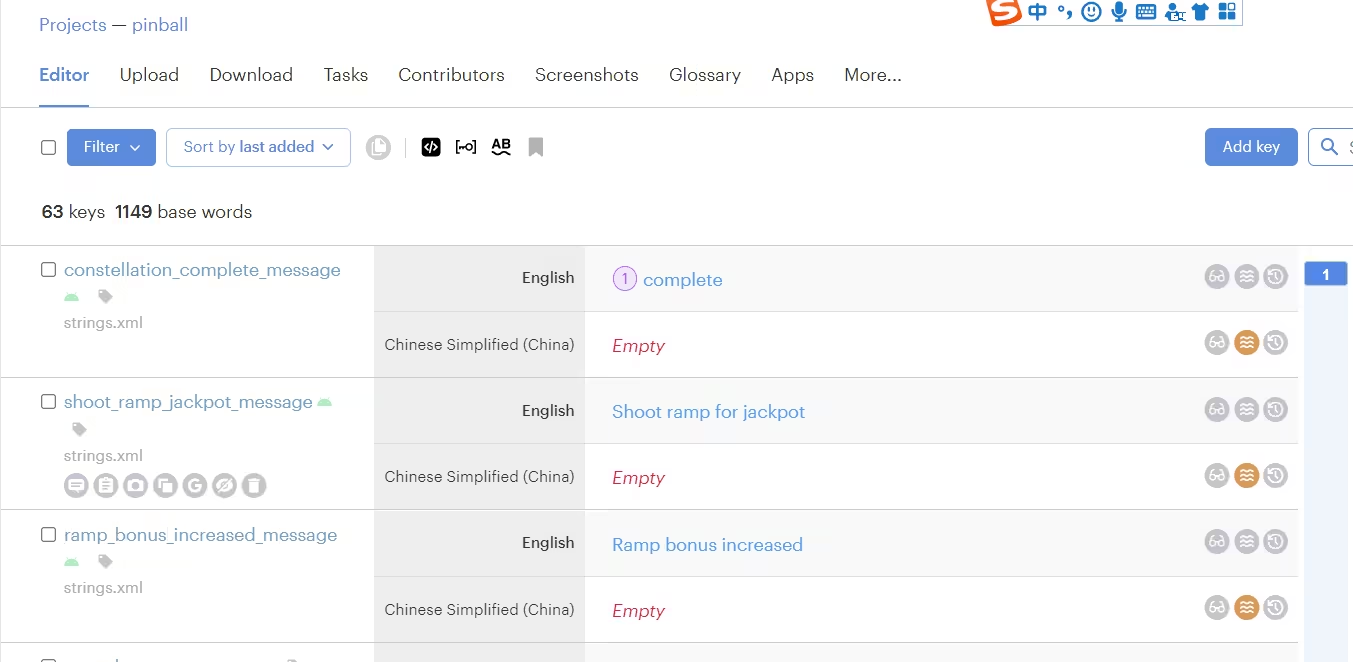
And you’ll land in the editor, where the translation work happens.
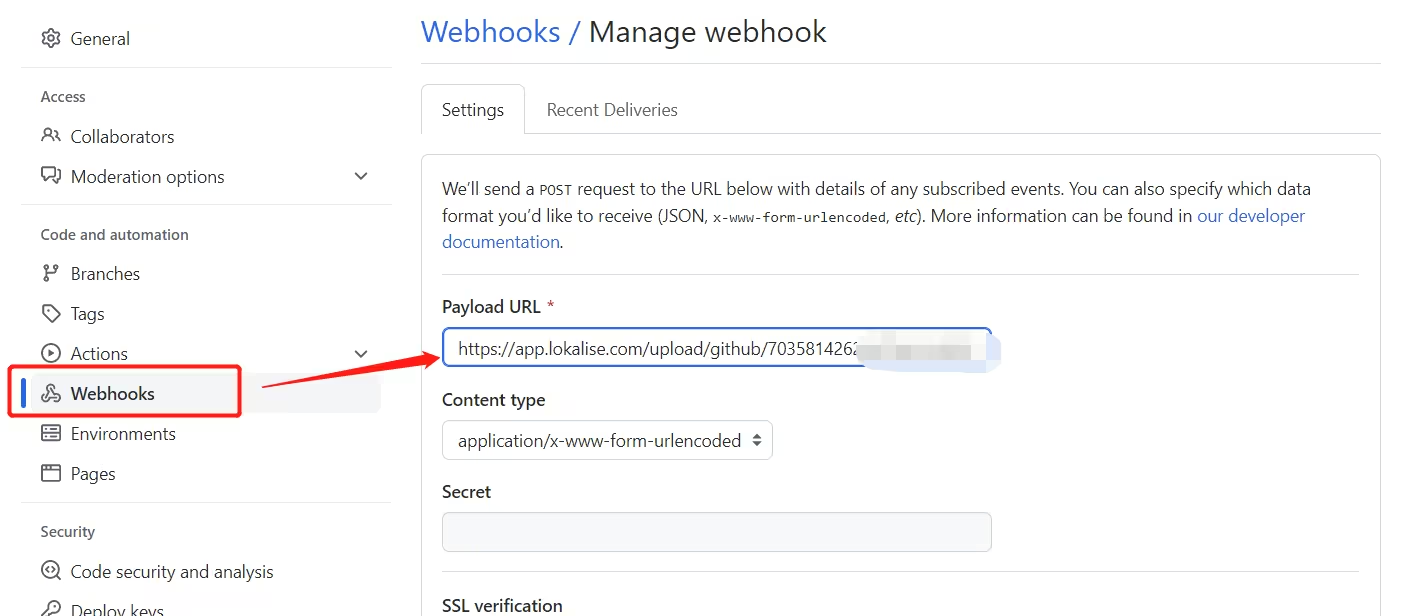
Now the important part: can the tool detect future changes automatically? Yes. By enabling webhooks on GitHub and pointing them at your project, any edit to the source strings synchronizes to the TMS in real time, with no manual step.
To test it, edit the source code on GitHub: add a new string and modify an existing one. The corresponding entries in the TMS update to match almost immediately.
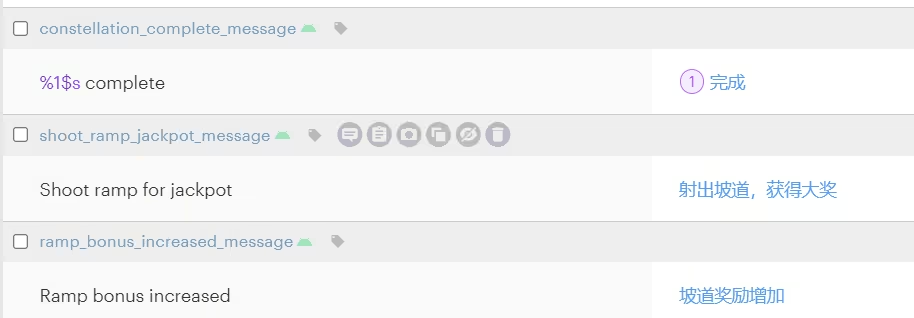
When translation is finished, the translated content is committed to the target-language folder in the repository, and localization is complete.
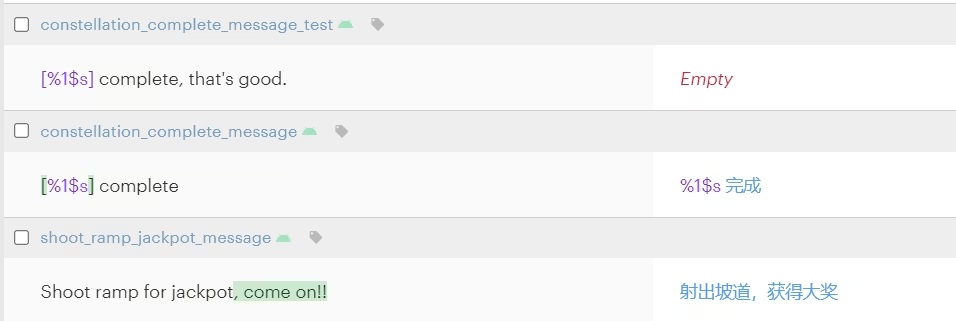
That small loop, editing a string, watching it appear for translation, and sending the translation back to the repo automatically, is continuous localization in miniature.
How to implement continuous localization
Most teams follow the same broad path. You don’t have to do all of it at once—start with basic automation and grow into more advanced workflows.
- Externalize all user-facing text. Continuous localization only works when translatable content is separated from your source code. Use stable, descriptive translation keys instead of inline strings (for example, “checkout.success” rather than the raw sentence), keep keys consistent, and avoid embedding variables directly inside text. This is an internationalization (i18n) prerequisite: get it wrong and everything downstream suffers.
- Connect your app to a localization platform. Whether your app fetches translations at runtime or bundles them at build time, you need a live connection between code and localization, via API, CDN delivery, repository integration, or webhooks. This lets translations update without requiring a full redeployment.
- Automate string synchronization. Decide when sync happens: on every pull-request merge, nightly, on release tags, or on every deployment. A CLI or integration handles the push-and-pull so your localization system always reflects the latest code.
- Automate translation where it makes sense. Translating every string by hand is impractical at speed. A common setup translates new strings automatically (machine or AI), reviews asynchronously, and reserves human review for critical languages and high-visibility features. This is a strategic decision, not just a technical one.
- Monitor and enforce quality. Continuous does not mean uncontrolled. Build in placeholder and variable validation, missing-translation checks in CI, alerts for untranslated content, and review states for key languages, so the team can move fast without leaking errors into production.
When continuous localization makes sense
Continuous localization delivers the most value for teams that:
- Ship frequently (weekly or faster).
- Support multiple languages.
- Already use CI/CD.
- Have distributed development and localization teams.
- Want to remove release bottlenecks caused by translation.
For these teams it quickly becomes essential rather than optional—and it scales beautifully, because adding language pairs doesn’t make the workflow more complex.
It’s worth being honest about the flip side, too. If your product is still developed in a waterfall style with infrequent, large releases, forcing a continuous localization setup adds overhead without a matching payoff. Your localization process should mirror your development process.
The signal to adopt continuous localization usually appears when release cycles accelerate, localization delays start blocking deployments, multiple teams contribute UI text, and manual export/import simply becomes unsustainable. At that point, it’s less a technical upgrade and more a scaling decision.
How a language service provider supports continuous localization
Continuous localization is often described as a tooling problem, but the automation only handles the mechanical parts. Someone still has to set up the workflow, do the translations, ensure they’re accurate, and keep the whole thing running smoothly. That’s where a language service provider fits into an automated pipeline.
A good LSP partner brings the things software alone can’t:
- Translators who can work daily and quickly.
- Tranlsators who are familiar with agile workflows, and who stay consistent across a product’s lifetime.
- The workload planning that keeps those translators available for your unpredictable string volumes.
- Subject-matter matching so the right linguist handles the right content; and the quality oversight (context-gathering, review, terminology management) that protects user experience when releases move fast.
The best results come from combining a continuous localization platform with a partner who understands both sides of the connection. Automation removes the friction; the partner ensures what flows through it is actually good.
Key takeaways
- Continuous localization integrates translation into your development cycle so localized content is always ready to release, rather than produced in a slow final stage.
- It’s the next step beyond agile localization: a continuous flow of work instead of sprint-based batches.
- Automation is the engine (detecting, syncing, triggering, validating, and delivering) but it complements human translation rather than replacing it.
- The hardest parts are often human, not technical: context for short strings, translator staffing and workload, and cross-team collaboration. This is where an experienced LSP adds the most value.
- It scales with the number of languages without adding workflow complexity, which is why it has become a standard approach for global software teams.
FAQ
In agile localization, translation happens in sprint-based batches, and content is ready to release only when a sprint completes. In continuous localization, translation is a continuous flow fully integrated into your delivery pipeline, so content is always release-ready. Continuous localization is essentially the fully realized version of what agile localization aims for.
Not strictly, but it makes the workflow far more effective. Without CI/CD you can still automate string sync and translation through APIs and integrations. With CI/CD, localization becomes fully embedded in development, keeping translations aligned with every code change and release.
No. Large organizations benefit greatly, but small and mid-sized teams gain value too—especially if they ship frequently, support more than one language, and want to avoid manual localization work. You can start with basic automation and add sophistication over time.
No. Most teams use a hybrid approach: machine or AI translation for speed, human review where quality matters, and different workflows for different languages or features. The goal is to automate where possible without compromising quality.
Through a mix of automated and human checks: placeholder and variable validation, missing-translation checks in CI, and review workflows for important languages—combined with dedicated translators who learn your product, screenshots and context for short strings, and consistent terminology management. Quality at speed is a process and a people problem, not just a tooling one.
A TMS is software that manages language assets and automates localization workflows, improving efficiency for translators and project managers. Modern TMS platforms connect directly to content sources and CAT tools, and some are open-source.
A VCS tracks changes to a file or set of files, and is widely used in software development. Common examples include Git, Subversion (SVN), and Mercurial. In continuous localization, the two-way link between your VCS and your TMS is the backbone of the workflow.